 Who Watches Me
Fix now
Every problem comes with a fix. Tap "Fix now" and the app walks you through them one by one.
No searching in settings, no guessing. The wizard does what it can by itself and shows you exactly where to tap for the rest.
Start free trial All features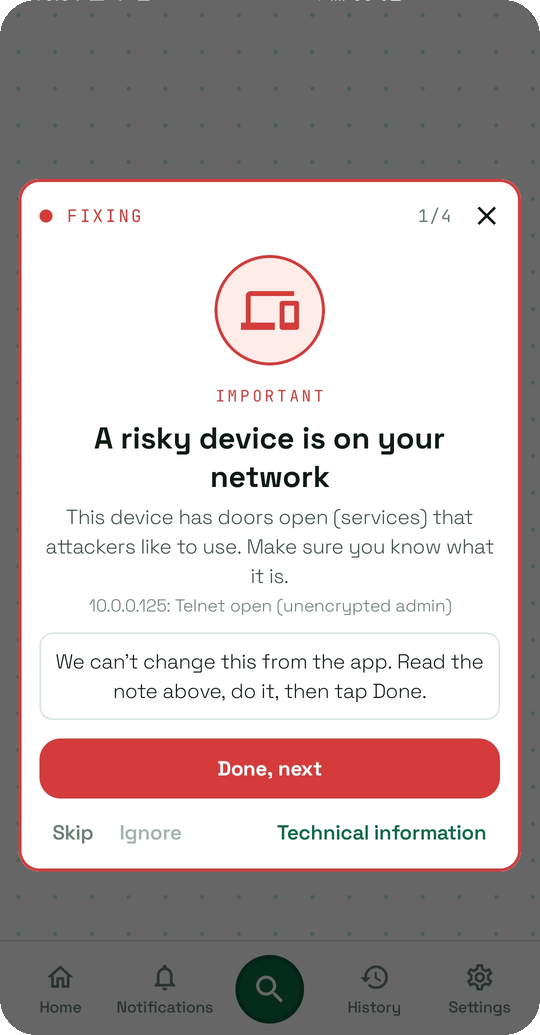
Why you should care
Finding problems is useless without fixing them
Most security apps stop at the scary list. We don't.
Android settings are a maze
"Where is the screen lock timeout?" — you shouldn't have to know.
Some things you want to keep
Your work VPN, your own router — mark them as fine and they are never shown again.
What Who Watches Me does for you
Step-by-step popup
Problem 1 of 6: what it is, why it matters, a button that fixes it or opens the exact setting.
Fix all
Everything that can be fixed automatically, in one tap.
Skip and Ignore
Skip for now, or ignore for good — the ignore list is yours to edit.
Red, orange, green — nothing else to learn
Everything on this page happens on your phone.
No app list, no traffic, no alert and no history is ever uploaded to us or anyone else. The only thing we store is your account email and name.
Good to know
What if a fix needs something the app can't do?
The step says so in plain words and shows what to do by hand; tap "Done, next" when you have.